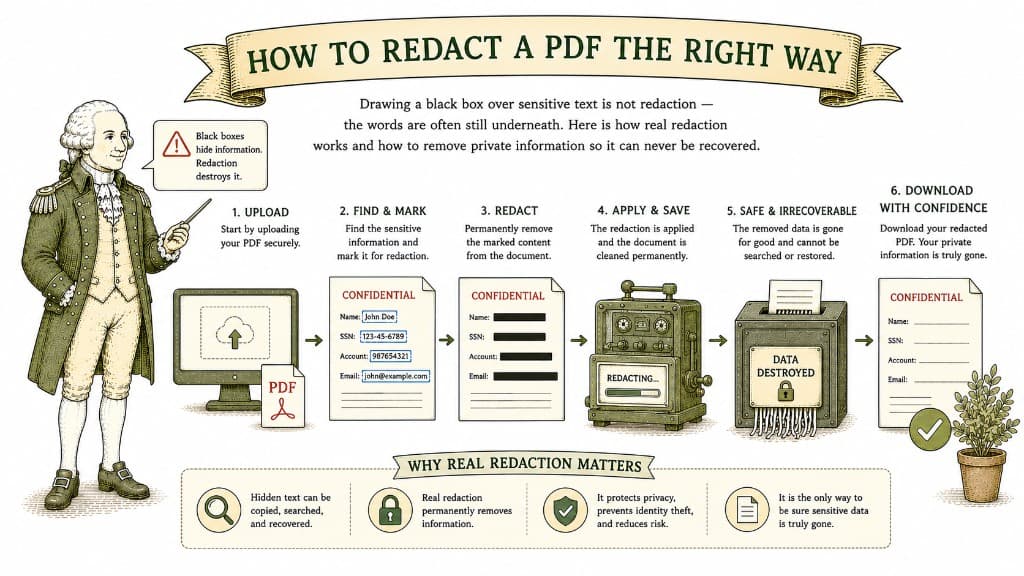
This is the mistake that has embarrassed law firms, corporations, and governments: someone draws a black rectangle over a Social Security number, saves the PDF, and sends it out — and the number is still there underneath, ready to be copied out by anyone who selects the text. A box on top of words does not delete the words.
Real redaction removes the content itself. As Adobe explains in its guide to redacting a PDF, changing the font color to white or laying a marker over text is unreliable; the underlying information remains and can be recovered.
A PDF can hold a visible layer and a text layer at the same time. When you draw a shape over a name, you have only added something to the visible layer. The text layer — the actual selectable characters — is untouched. Anyone can drag their cursor across the "redacted" area, copy it, and paste it somewhere to read it. Some tools even let you simply delete the box.
True redaction deletes the underlying text and replaces the area, so there is nothing left to recover.
Visible content is only half the job. PDFs carry metadata: the author's name, the software used, sometimes a trail of earlier edits. A document can be perfectly redacted on the page and still leak who made it and when. Sanitizing the file removes that hidden information along with the visible redactions.

If you own the document and know the password, removing it is straightforward. Here is how it works, and where the honest limits are.
3 min read
Uploading a sensitive document to a website you found ten minutes ago is a real act of trust. Here is how to judge whether a tool deserves it before you hand over anything important.
3 min read
A password is the simplest layer of protection you can add to a document. Here is what a PDF password actually does, what it does not do, and how to use it without locking yourself out.
3 min read